
Analytics, Cost Tracking, and AI Telemetry
The Analytics module, accessible under the Insights section of the navigation sidebar, provides organisation administrators and team managers with comprehensive observability over inference spend, token volumes, and operational adoption across connected language models (LLMs).
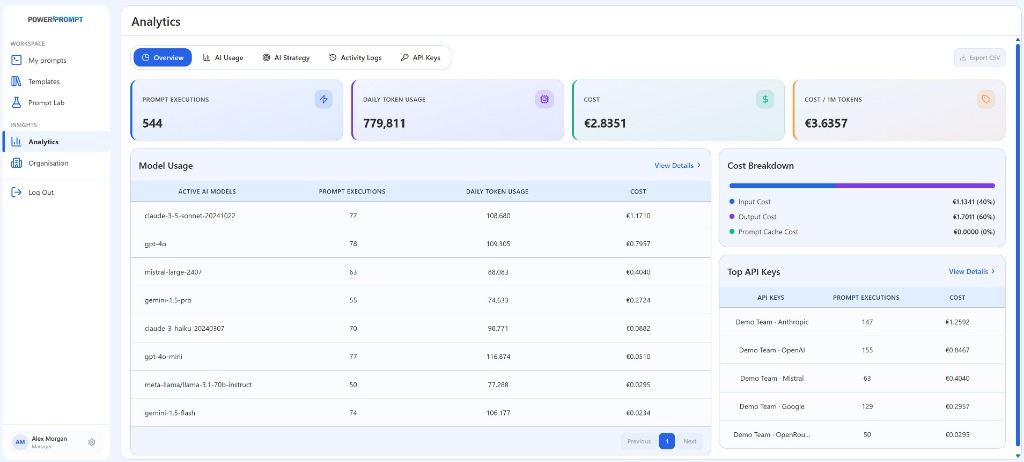
1. Analytics Module Architecture
The module header consolidates five specialized functional tabs and a primary telemetry export action:
- Overview: executive dashboard unifying key performance indicators (KPIs), model-level consumption, multi-component cost breakdowns, and top-ranking API keys.
- AI Usage: deep-dive telemetry exploring historical token consumption curves and execution frequencies partitioned by model and time horizon.
- AI Strategy: strategic model routing policies, threshold governance, and model suitability guidelines tailored to specific business use cases.
- Activity Logs: granular chronological audit trail of individual inference requests and execution outcomes.
- API Keys: specialized analytics view breaking down financial expenditure by individual credential and team assignment.
Export CSVButton: immediate download of structured telemetry datasets for financial accounting and inter-departmental chargeback.
2. The Four Executive KPIs (Header Metrics)
Four summary cards deliver real-time operational visibility over the selected reporting period:
| Metric | Sample Value | Operational Significance |
|---|---|---|
| PROMPT EXECUTIONS | 544 | Cumulative volume of prompt invocations and test runs processed through the platform. |
| DAILY TOKEN USAGE | 779,811 | Total input and output tokens processed across all models over the current 24-hour cycle. |
| COST | €2.8351 | Cumulative financial expenditure computed in reporting currency. |
| COST / 1M TOKENS | €3.6357 | Average unit cost per one million processed tokens. The foundational FinOps metric for evaluating macro prompt efficiency. |
3. Model Consumption Breakdown (Model Usage)
The central Model Usage table outlines operational performance and expenditure across each connected production model:
- Tracking Columns:
ACTIVE AI MODELS: technical model identifier (e.g.,claude-3-5-sonnet-20241022,gpt-4o,mistral-large-2407,gemini-1.5-pro,claude-3-haiku-20240307,gpt-4o-mini,meta-llama/llama-3.1-70b-instruct,gemini-1.5-flash).PROMPT EXECUTIONS: total request count routed to the specific model.DAILY TOKEN USAGE: token volume consumed by the model.COST: financial expenditure incurred.
View Details >Link: routes directly into the dedicated AI Usage tab to inspect longitudinal trends and historical distributions.
4. Cost Breakdown Analysis
The upper-right card separates financial expenditure across three technical pipeline dimensions:
- Input Cost: expenditure incurred by prompt instructions, context payloads, and injected dynamic variables. Typically represents 30% to 45% of gross spend (e.g., 40% / €1.1341).
- Output Cost: expenditure incurred by completion tokens generated by the model. Because completion unit prices are higher, this category commonly represents the majority of expenditure (e.g., 60% / €1.7011).
- Prompt Cache Cost: telemetry tracking savings delivered by prompt caching (Anthropic Claude and OpenAI prompt cache architectures). For repetitive system prompts, caching cuts input token rates by 50% to 90%.
5. Top API Key Utilization
The lower-right table ranks active team credentials by financial volume:
- Columns: credential name (
API KEYS, e.g., Demo Team - Anthropic, Demo Team - OpenAI, Demo Team - Mistral), total executions (PROMPT EXECUTIONS), and cumulative spend (COST). View Details >Link: jumps directly into the API Keys analytics view to review quotas and historical credential spend.
6. Recommended FinOps Practices for Managers
- Track Cost per Million Tokens: if this ratio spikes unexpectedly, inspect whether simple extraction or classification tasks are being routed to expensive frontier models (such as Claude 3.5 Sonnet or GPT-4o) when economical tiers (Haiku, GPT-4o mini, Flash) would achieve comparable fidelity.
- Optimize Prompt Context Volume: leverage the Prompt Improver inside Prompt Lab to remove conversational filler and reduce input token spend systematically.
- Design for Prompt Caching: keep system prompts and base instructions standardized at the start of prompts to maximize cache hit rates on repetitive tasks.