
Prompt Lab: Architect & Improver
The Prompt Lab is Power Prompt’s dedicated AI engineering studio, accessible directly from the primary workspace navigation. Powered by platform-configured language models, it assists teams in architecting new system prompts from scratch and refining existing instructions for production workloads.
The Prompt Lab provides two specialized modes:
- Prompt Architect: a conversational design assistant to craft and structure prompts from business requirements, offering instant format targeting (Standard Markdown, Claude XML, GPT Markdown, JSON).
- Prompt Improver: an advanced optimisation engine to audit, clarify, and harden existing prompts against production failure modes.
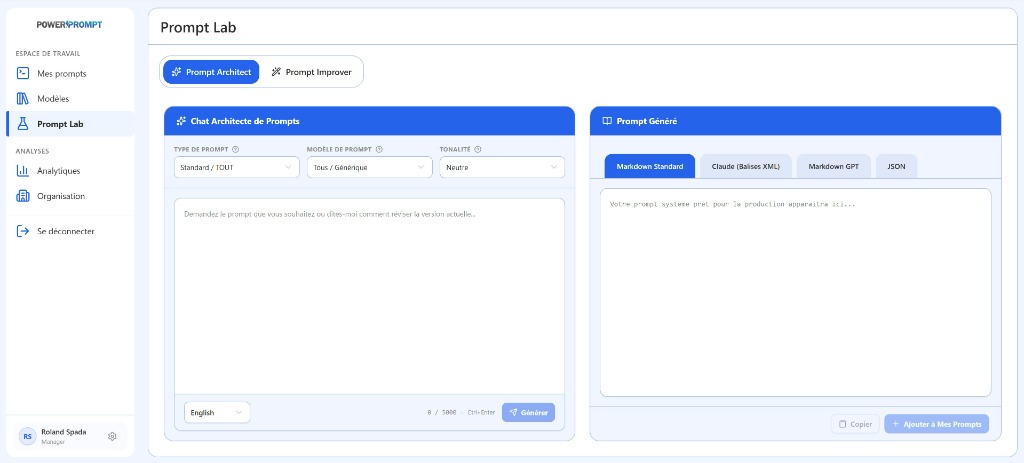
1. Prompt Architect (Design and Generation)
The Prompt Architect mode bridges the gap between raw business intent and fully structured, production-ready system instructions.
Workspace Layout
The interface is organized into two synchronized panels:
- Left Panel (Chat Architecte de Prompts): conversational steering panel with model targeting and iterative dialogue controls.
- Right Panel (Prompt Généré): real-time code preview, multi-format switching tabs, and direct library export actions.
AI Configuration Controls
Before or during your session with the Architect, three primary dropdown parameters guide prompt generation:
| Parameter | Options | Operational Function |
|---|---|---|
| Type de prompt (Prompt Type) | Standard / TOUT, Role & Persona, Procedural Workflow, Structured Extraction… | Determines the structural skeleton and operational persona. |
Target AI Model (Modèle IA cible) | Tous / Générique, Claude (Anthropic), GPT (OpenAI), Mistral / Llama… | Adapts prompt heuristics and formatting conventions to target LLM tokenizers. |
| Tonalité (Tone) | Neutre, Professionnel, Pédagogique, Technique, Direct / Concis… | Calibrates stylistic register and verbosity. |
Iterative Conversational Workflow
The central dialogue box (“Demandez le prompt que vous souhaitez ou dites-moi comment réviser la version actuelle…”) supports iterative, multi-turn refinement:
- State your objective: describe your requirements in natural language (e.g., “I need a production system prompt for a financial analyst extracting risk disclosures from quarterly reports”).
- Select output language: pick your preferred output language (e.g., English, Français) using the lower-left selector.
- Generate: click the Générer button or press keyboard shortcut
Ctrl+Enter. The character meter monitors input size (up to 5,000 characters per turn). - Iterate and revise: refine the prompt progressively without starting over (e.g., “Add strict negative constraints against unverified assumptions”, or “Force key metrics into bullet points”). The Architect updates the right-hand output accordingly.
Multi-Format Target Tabs (Right Panel)
The Prompt Généré panel provides one-click format conversion adapted to modern LLM production stacks:
- Markdown Standard: clean, human-readable layout featuring hierarchical headers, lists, and code blocks. Ideal for universal usage and cross-team review.
- Claude (Balises XML): strict XML tag encapsulation recommended by Anthropic (e.g.,
<context>,<instructions>,<rules>,<examples>,<output_format>). Minimizes prompt injection risks and ensures high guideline compliance. - Markdown GPT: tailored formatting optimized for OpenAI GPT system instructions and parsing rules.
- JSON: structured JSON schema output, ideal for headless backend pipelines, API integration, and automated agents.
Export Actions and Library Bridge
Two quick-action buttons at the bottom of the right panel streamline downstream delivery:
- Copier (Copy): copies the complete formatted prompt to your clipboard.
- + Ajouter à Mes Prompts (Add to My Prompts): immediately creates a new record in your personal Mes prompts workspace, pre-populated with the generated content. From there, you can:
- Assign categories and up to 4 tags.
- Configure dynamic
{{variables}}. - Run side-by-side benchmark evaluations.
- Publish the prompt for team-wide sharing.
2. Prompt Improver (Auditing and Hardening)
The second mode, Prompt Improver, is dedicated to reviewing existing prompts to enhance reliability and reduce token overhead.
Key Optimization Pillars
The Improver evaluates your instructions against core prompt engineering standards:
- Token efficiency: strips conversational fluff, passive voice, and redundant clauses to decrease latency and token spend.
- Determinism and negative guardrails: replaces ambiguous advice with mandatory rules and explicit boundary constraints.
- Variable auto-detection: locates hardcoded values (dates, tenant names, product codes) and suggests reusable
{{variable}}slots. - Edge-case handling: introduces fallback procedures when user inputs are corrupted, incomplete, or out of scope.
Side-by-Side Review
Prompt Improver provides a visual diff highlighting proposed alterations. Users review each modification before applying changes or saving a new version draft.
3. Workflow Decision Matrix
| Starting Situation | Recommended Tool | Core Action |
|---|---|---|
| Unstructured idea or new business requirement | Prompt Architect | Describe the intent, select format, and export ready-to-run prompt. |
| Working prompt that needs token reduction or hardening | Prompt Improver | Cut verbosity, enforce guardrails, and convert static terms to variables. |
| In-progress drafting inside the primary editor | Améliorer le prompt (Editor) | Instant one-click AI improvement without leaving the page. |
| Comparing multi-provider execution performance | Test & Multi-Model Evaluation | Run benchmark tests across OpenAI, Claude, and Gemini with real inputs. |