
AI Integrations and API Key Governance
To enable users to test and execute prompts against real-world models, Power Prompt provides a unified API key governance console. Located within the API Keys tab of the Organisation menu (under the Insights section in the navigation sidebar), this interface enables managers to oversee model connections, inspect usage telemetry, and govern credential lifecycles.
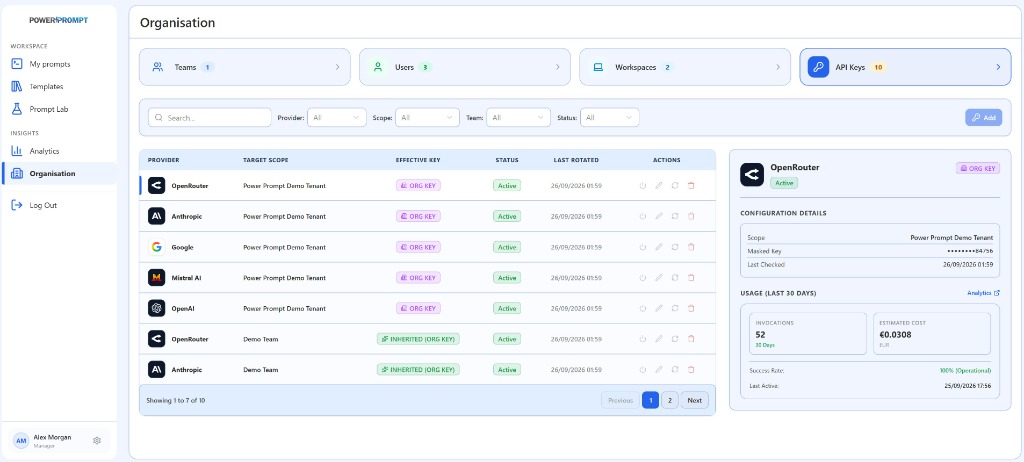
1. The Key Management Console
The screen brings together a multi-criteria filter toolbar, a centralized credentials table, and an interactive real-time inspection drawer.
Search Toolbar and Filter Controls
Located directly above the main table, five controls allow managers to quickly filter credentials:
- Search Bar (
Search...): immediate text search matching provider names or scope strings. - Provider: filter by AI provider (e.g., OpenRouter, Anthropic, Google, Mistral AI, OpenAI).
- Scope: filter by organizational level (Organisation or Team).
- Team: target a specific team roster.
- Status: filter by operational state (Active, Inactive).
+ AddButton: opens the drawer to provision a new API credential.
2. Credentials Table and Key Inheritance
The main table lists configured credentials alongside their governance attributes:
| Column | Description | Operational Role |
|---|---|---|
| PROVIDER | Provider brand logo and name | Visual identification of the connected AI infrastructure. |
| TARGET SCOPE | Assigned target entity | Application perimeter: root tenant (Power Prompt Demo Tenant) or specific team (Demo Team). |
| EFFECTIVE KEY | Origin and pedigree of the key | Distinguishes root organization credentials (ORG KEY) from inherited team credentials (INHERITED (ORG KEY)). |
| STATUS | Operational status badge | Live indicator of credential availability (Active in green). |
| LAST ROTATED | Rotation timestamp | Date and time of the last key rotation. |
| ACTIONS | 4 quick-action buttons | Immediate management: toggle state, edit properties, verify connectivity, or revoke key. |
The Key Inheritance Architecture
Power Prompt streamlines multi-team administration through automatic key inheritance:
- Organisation Key (
ORG KEYin purple): configured at the tenant root. Serves as the default shared inference engine for the entire organization. - Inherited Key (
INHERITED (ORG KEY)in green): teams automatically inherit organization-level keys without requiring redundant setup or duplicate billing accounts. - Team Overrides: if a team operates under an isolated budget or dedicated enterprise agreement, managers can provision team-specific keys that cleanly override root inheritance.
Quick Row Actions (ACTIONS)
Each table row provides four immediate operational actions:
- Toggle State (Power icon): temporarily suspend or resume inference traffic without deleting the configured secret.
- Edit (Pencil icon): update the API token or modify target scope assignments.
- Test and Synchronize (Refresh icon): execute a real-time connectivity ping against the provider API to update the Last Checked status.
- Revoke (Trash icon): permanently delete the credential from the platform.
3. Key Inspector Panel (Right Drawer)
Selecting any row in the table opens an inspection card on the right-hand side, divided into two distinct sections:
Configuration Details (CONFIGURATION DETAILS)
- Scope: corporate entity or team assigned to the key.
- Masked Key: secure display format (e.g.,
*********84756), revealing only terminal characters for administrative verification without compromising secrets. - Last Checked: exact date and time of the most recent verified health check.
Usage Telemetry (USAGE - LAST 30 DAYS)
This card aggregates real-time operational telemetry for the active credential over the preceding 30 days:
Analytics ↗Link: provides direct navigation into the deep Analytics dashboard for comprehensive reporting.- Invocations: total prompt runs and test executions processed through the key (e.g.,
52 / 30 Days). - Estimated Cost: cumulative financial expenditure computed in platform currency (e.g.,
€0.0308 EUR). - Success Rate: reliability percentage of upstream API requests (e.g.,
100% Operationalin green). - Last Active: timestamp of the most recent user inference request.
4. Supported AI Providers
The platform natively supports leading model providers and inference gateways:
- OpenRouter: universal gateway offering unified model routing, latency optimisation, and broad model access.
- Anthropic: direct connection to Claude models (Claude 3.5 Sonnet, Claude 3.5 Haiku, Claude 3 Opus).
- Google: integration with the Gemini family (Gemini 1.5 Pro, Gemini 1.5 Flash, Gemini 2.0).
- Mistral AI: sovereign European foundation models (Mistral Large, Codestral, Pixtral).
- OpenAI: frontier models including GPT-4o, GPT-4o mini, and advanced reasoning architectures (o1, o3-mini).
- Private Endpoints & Sovereign Gateways: OpenAI-compatible API endpoints (e.g., vLLM, Ollama, LiteLLM) for on-premise or sovereign deployments.
5. Security Standards and Secret Rotation
- AES-256 Storage Encryption: all credentials are encrypted at rest within the database.
- Zero Browser Secret Exposure: plaintext keys are never returned to client browsers following initial submission.
- Rotation Governance: monitor the
LAST ROTATEDcolumn to enforce regular credential cycling (recommended every 90 days).