Browser Extension
The Power Prompt browser extension empowers collaborators to access their complete organizational prompt library directly inside their daily web workflow, without navigating away from active tabs.
1. Multi-Browser Ecosystem
Power Prompt provides a dedicated native extension compatible with all major enterprise browsers:
- Google Chrome
- Microsoft Edge
- Mozilla Firefox
- Apple Safari
- Opera
- Brave
- Vivaldi
How to Install Your Extension
Installation takes just a few seconds from your Power Prompt account:
- Log in to your Power Prompt web instance.
- Open your Personal Space by clicking your avatar or settings cog in the bottom-left corner of the sidebar.
- Switch to the Extensions tab.
- Locate the card corresponding to your active web browser.
- Click Install to add the extension directly to your browser.
- Pin the Power Prompt icon to your browser toolbar for quick one-click access.
2. Anatomy of the Power Prompt Extension
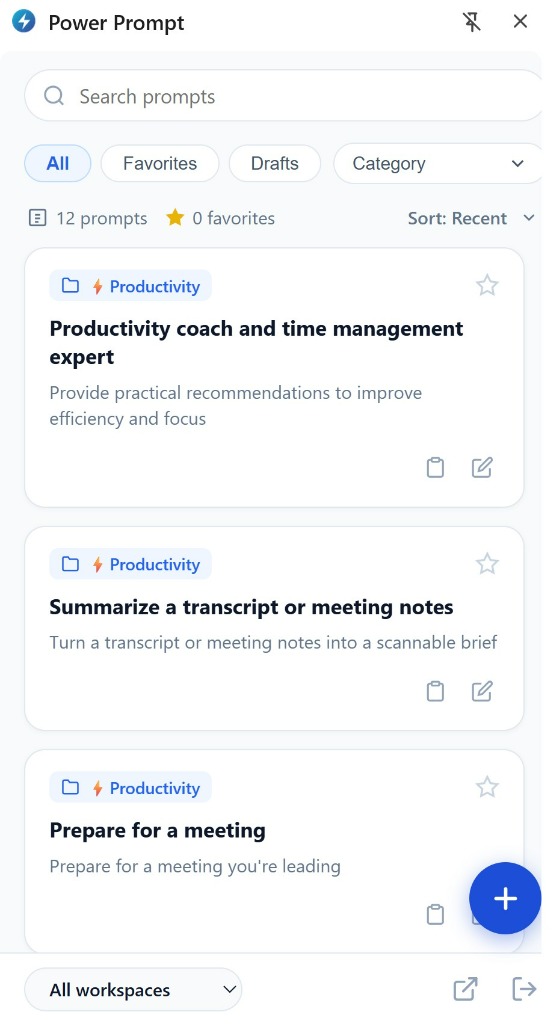
The extension condenses core library functionality into a compact, responsive interface:
Search Bar and Quick Filters
- Instant Search (
Search prompts): filters prompts dynamically by matching keywords across titles and descriptions. - Status Filter Tabs:
- All: catalogues all accessible certified prompts.
- Favorites: isolates starred prompts for fast routine access.
- Drafts: displays your personal work-in-progress drafts.
- Category: dropdown menu filtering assets by business folder (e.g., Productivity, Support, Marketing).
- Metrics and Sorting: displays total available prompts (e.g., 12 prompts), favorite count, and active sorting order (Sort: Recent).
Prompt Cards and Direct Actions
Each card displays vital operational context:
- Category Badge: thematic folder classification (e.g.,
📁 ⚡ Productivity). - Favorite Star: toggle asset inclusion in your personal favorites with a single click.
- Title & Description: clear operational mandate (e.g., Productivity coach and time management expert).
- Copy Action: copies the resolved prompt directly to your clipboard.
- Edit Action (Pencil icon): jumps directly to the full web editor to revise instructions or publish new versions.
Floating Quick-Create Button (+)
The floating blue + button in the bottom-right corner allows users to draft and save a new prompt immediately from within the extension, without switching to the full web application.
Bottom Navigation Controls
- Workspace Selector (
All workspaces): switch between team workspaces instantly to load department-specific prompts. - Open Web App Link: launches the full Power Prompt workspace in a new browser tab.
- Session Logout: securely closes the active session on your workstation.
3. Daily Operational Workflow
Injecting Prompts into Web Tools
The extension operates seamlessly alongside any web application:
- Place your cursor inside the text area of your web tool (e.g., ChatGPT, Claude, Microsoft Copilot).
- Launch the Power Prompt extension via its toolbar icon or keyboard shortcut.
- Select the prompt tailored to your task.
- If dynamic variables
{{variable}}are present, fill in contextual values within the prompt runner. - Copy or paste the finalized prompt directly into your active tool.